
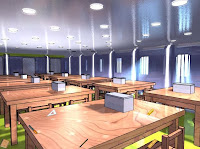
 Craft Room Escape Game is another text driven point'n'click room escape game from the makers of Science Room Escape and etc. In this game, you are in a Craft Room and you need to escape there by doing right things. Good luck and have fun!
Play This Game
Play Random Game
Frequently Asked Questions about Craft Room Escape
What is Craft Room Escape?
Craft Room Escape is an escape game to play and have fun while you try to escape from the room or outdoor place by using your point and click and puzzle solving skills. You may need to find and use hidden items and clues around, combine some items with other items to use them on correct places, and solve some different types of puzzles.
How can I play Craft Room Escape?
You can play Craft Room Escape game with your mouse and point and click skills to find items and clues, use them on correct places, and solve some puzzles. You can navigate between rooms or screens and you may also zoom on some places to look closer. You may select items from your inventory to use or you may drag and drop them.
How can I solve Craft Room Escape?
You can solve Craft Room Escape game by looking around to find and use items and clues on correct places, combining items, and solving some puzzles. You can also check comments section for hints or ask to other players to get help from them. If you still can't figure out any part of the game, you can also check video walkthroughs.
Can I post hints for Craft Room Escape?
Yes, you can post your comments to share your hints or walkthroughs for Craft Room Escape game to help other players. They may check your hints, if they can't figure out some parts of games. You can also reply and help other players, if they ask for help in comments section. We will all be thankful for your help and hints for the games.
Can I play Craft Room Escape on my phone or tablet?
Yes, like most of new online escape games here, you can also play Craft Room Escape game on your mobile phone or tablet. You just need to visit our website on your mobile device's browser to play games online. We also post and share new mobile escape games to download and play directly on your Android or iOS mobile device.
13 Comments
I got a notebook and Pencil (used pencil on notebook), turned off the lights, placed the triangle on the box and got a screwdriver blade but I can't put it into the screwdriver handle.
ReplyDelete(cont.)I then clicked on the windows to get the filer, then used it on the box on the far right-hand side that has a rusted top to get "nippers". Then I used the nippers to cut the box that had wires on it (I think next to the rusted box) and got a loupe (don't know what it's used for). Now I'm stuck..
ReplyDeleteYou've done everything correctly.
ReplyDeleteUnfortunately they have changed the first bug-free game (English version) to a buggy one :(
I hope they'll will fix it again.
The bug is that the box with
ReplyDeletethe triangle? I have everything
untill the loupe. Does not work
with anything. Do we have to
have lights on or off??
Yes, the bug is that box. And because of this bug you're not able to pick up the handle of the screwdriver. No need to do anything with the lights again.
ReplyDeleteWhen I first played it earlier, it worked well, I'm not sure what happened. Maybe they wanted to change something and uploaded a buggy version. The Japanese version still works. I hope they'll fix the English version soon :)
I don't like this game
ReplyDeleteAnd any of these kind of games
Please give us true games
Para los que hablan español:
No me gusta este tipo de juegos, estoy esperando verdaderos juegos de room-escape AGAIN please
I completed the japanese version and I don't even speak or read japanese. I wish they would get the bugs out of the english version
ReplyDeleteI was able to pick up the handle..
ReplyDeleteWalkthough continued:
ReplyDeleteClick the loupe and it should go to the box..
A wrench(actually named something else) comes out. You click it. It goes to the window and a black out occures..
You won!
Yes, it seems that the English version is fixed now again :)
ReplyDeleteI got out. There was no bug in my game.
ReplyDeleteWALKTHROUGH
ReplyDelete1)pick up book
2)pick up pencil
3)write on book with pencil
4)press on window than pick up file
5)open box with file
6)use pliers on second box on right
7)press right most light to turn off lights
8)put the triangle on the box and press triangle
9)pick up screwdriver handle
10)use lattice on second left box
11)use screwdriver on box
12)use wrench on window
YOUR OUT
i am out without any help
ReplyDeleteit is very easy
You can post your comments to share your opinion about games, share your hints to help other players or ask help from them. If you can't sign in with your Google account, when you try to post your comment, you have to allow cookies on your browser for this website.
EmojiYou can also check recent comments to help other players, if they need help about games.