
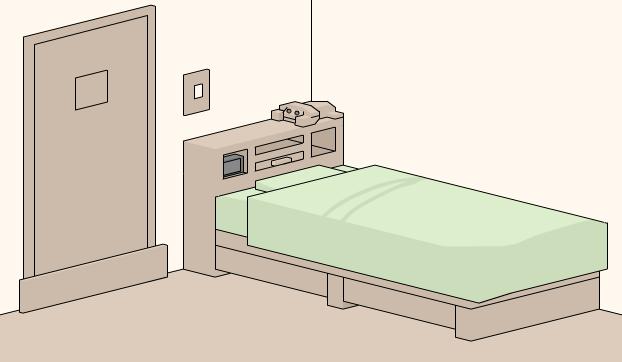
 Norakurabako Escape aka The Box is another point and click room escape game. One day, you receive an envelope containing a map. Having some free time, you decide to go take a look at the location. There is a small building without any windows. It says "Please enter freely" on the door. Thinking it is a model room, you enter the building. It looks comfy but there is one problem. You can't get out! There's no doorknob on the door and no windows either. Good luck and have fun!
Play Norakurabako Escape
Play Random Game
Frequently Asked Questions about Norakurabako Escape
What is Norakurabako Escape?
Norakurabako Escape is an escape game to play and have fun while you try to escape from the room or outdoor place by using your point and click and puzzle solving skills. You may need to find and use hidden items and clues around, combine some items with other items to use them on correct places, and solve some different types of puzzles.
How can I play Norakurabako Escape?
You can play Norakurabako Escape game with your mouse and point and click skills to find items and clues, use them on correct places, and solve some puzzles. You can navigate between rooms or screens and you may also zoom on some places to look closer. You may select items from your inventory to use or you may drag and drop them.
How can I solve Norakurabako Escape?
You can solve Norakurabako Escape game by looking around to find and use items and clues on correct places, combining items, and solving some puzzles. You can also check comments section for hints or ask to other players to get help from them. If you still can't figure out any part of the game, you can also check video walkthroughs.
Can I post hints for Norakurabako Escape?
Yes, you can post your comments to share your hints or walkthroughs for Norakurabako Escape game to help other players. They may check your hints, if they can't figure out some parts of games. You can also reply and help other players, if they ask for help in comments section. We will all be thankful for your help and hints for the games.
Can I play Norakurabako Escape on my phone or tablet?
Yes, like most of new online escape games here, you can also play Norakurabako Escape game on your mobile phone or tablet. You just need to visit our website on your mobile device's browser to play games online. We also post and share new mobile escape games to download and play directly on your Android or iOS mobile device.
2 Comments
I have NO idea what is going on with that one. Or what several of the items are. SOmeone please post a walkthrough.
ReplyDeleteNorakurabako walkthrough:
ReplyDelete1)click the three parts of the bed, noting the contents of the piece of paper.
2)click the bed pieces in reverse order, to put them back down.
3)Click the tail of the dog, and take the key within and use it to open the drawer, getting the screwdriver. Also, click elsewhere on the dog to lift it up for another piece of paper.
4)Open the bottom right drawer on the bed, and make it look like the calander. You may have to click on individual squares to rotate them, as well as moving them in the grid.
5)take the item below it, and make a note of the note below it. It is the major clue for the code.
6)Moving right, click on the right painting. You need to get all the dots flattened. Just keep at it, using the arrows to shift those rows appropriately. Work toward getting an L shape in a corner.
7)Take the items, and check under the cushions for another paper.
8)moving right again, take the nub protruding from the third red pillar. Also, move to the left of that, getting a DVD ROM from amidst the other dvds. Also, look at the note ontop of some more DVDs to the left, and under the two bears on the floor.
9)In the drawer under the TV, there's a hammer and Crowbar. Take them.
10)moving right again, you're at the computer. Solve the box puzzle to the bottom left of the computer by "popping" them all out at once. i suggest mapping what each one does.
11)take the dvd and click again, revealing a secret compartment with a key.
12)Use the two keys in your inventory to open two of the three drawers, and the screwdriver to open the computer.
13)Take a wire and read the note from the computer.
14) using the hammer, open the middle drawer and punch a hole in the back, taking a wire from the hole.
15)also, take the battery from in between the two leftmost struts of the monitor. Put both batteries in the keyboard.
16)going back to the first screen, pry off the board with your crowbar, and attach the handle in your inventory.
17)Now, click the briefcase on the left bottom drawer. Using the codes from the pieces of paper, you can figure out the code If you need more help
the code if based on two things. the element determines the order, and which letter to use for each word. to convert from letters to numbers, run diagonally left-up on your keyboard from the letter to see which number it corresponds to
18)Take the key and cable within.
19)go to the TV. Combine one of your cables with the DVD player, and one to the TV. Turn them both on.
20)open the dvd player by clicking on the tray. Put in the dvd rom. close it. Click the red button. Then remove it.
21) go back to the computer. Use your new key to open the top drawer. You should get a deck of cards and a razor.
22) While you're here, use the cable on the tower of the computer. Push the power button. You'll come back to this later.
23) go back to the paintings. Use your razor on the left one. Then turn off the lights, and return.
24) now, go to the computer again. click the monitor, and type in what you saw, except with a K before the second word, and click OK twice.
25)Now, go back to the computer, install the DVD drive in the computer by dragging it there. Then click the door to open it, and put your burned DVD in it.
26)Getting closer to the end now. Go back to the room with the paintings. Take the deck of cards, and put them on the table. Figure out which four are out of order by
Starting with the first card, write out the cards until you reach it again. Then start a new row under it, starting with that card. You should end up with four near-identical rows. Find where the mixed up cards are, and there should be one of each suit.
This is the code to the card briefcase in the computer room.
27) open the briefcase and take the weights and black light flashlight.
28) now the weight puzzle. Set your weights on the platform to the right of it. Then click it. Given that the smallest weight is 1, map all the possible combinations, 0-24, to a number.
29)now, turn the lights off, and take your black light to the plaque underneath the painting you slashed. These numbers tell you which six of the symbols you just mapped to look for, and press in that order.
30)I would suggest taking a screenshot of the image from the TV, and the computer, as references here, which can be done by hitting the prt scrn button, then opening paint, and clicking paste. Go to the main door, now, and map the corresponding colored symbol, to the door symbols, via the TV, and you're out.
You can post your comments to share your opinion about games, share your hints to help other players or ask help from them. If you can't sign in with your Google account, when you try to post your comment, you have to allow cookies on your browser for this website.
EmojiYou can also check recent comments to help other players, if they need help about games.