
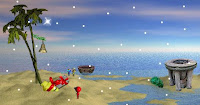
 106th episode of point and click Wogger Mini adventure game series from makers of original Wogger game. Again you need to point and click on right places and do right things to help the little spaceman wogger. Have fun!
Play This Game
Play Random Game
Frequently Asked Questions about Wogger Mini Chapter 106
What is Wogger Mini Chapter 106?
Wogger Mini Chapter 106 is an escape game to play and have fun while you try to escape from the room or outdoor place by using your point and click and puzzle solving skills. You may need to find and use hidden items and clues around, combine some items with other items to use them on correct places, and solve some different types of puzzles.
How can I play Wogger Mini Chapter 106?
You can play Wogger Mini Chapter 106 game with your mouse and point and click skills to find items and clues, use them on correct places, and solve some puzzles. You can navigate between rooms or screens and you may also zoom on some places to look closer. You may select items from your inventory to use or you may drag and drop them.
How can I solve Wogger Mini Chapter 106?
You can solve Wogger Mini Chapter 106 game by looking around to find and use items and clues on correct places, combining items, and solving some puzzles. You can also check comments section for hints or ask to other players to get help from them. If you still can't figure out any part of the game, you can also check video walkthroughs.
Can I post hints for Wogger Mini Chapter 106?
Yes, you can post your comments to share your hints or walkthroughs for Wogger Mini Chapter 106 game to help other players. They may check your hints, if they can't figure out some parts of games. You can also reply and help other players, if they ask for help in comments section. We will all be thankful for your help and hints for the games.
Can I play Wogger Mini Chapter 106 on my phone or tablet?
Yes, like most of new online escape games here, you can also play Wogger Mini Chapter 106 game on your mobile phone or tablet. You just need to visit our website on your mobile device's browser to play games online. We also post and share new mobile escape games to download and play directly on your Android or iOS mobile device.
7 Comments
Sorry. I'm in the same boat. I click on the two bows and then crash; it starts over again. Don't know where the heck to click next.
ReplyDeleteHere is a walk through. First click on the red bow on the yellow gift.It will fly up to the star above the tree.Now very quickly ( you need to get the timing right) click on the red bow on the other gift.It too flies to the star and produces fireworks..
ReplyDeleteClick on the yellow gift and it will turn on its end and shoots a small star out of the end. Take this star and place it at the back of the yellow gift, it turns into a rocket and flies off and produces more fireworks.
Take the green rock and place it on top of the fire pit ( the bowl thing), take the grey gift and place that on top of the green rock. Now click the grey gift again. It will turn into paper and squashes the green rock down.
Now take the star next to the fire pit and place it underneath the bowl on the ground.It ignites and produces lots of pretty lights.. Now click on the bell on the tree to ring out the new year.
Then click on the fire bowl once more for a huge explosion of light, Happy New Year Wogger!
Very nice episode
ReplyDeleteThnxs Pepper it helps a lot
ReplyDeleteno problem momo!
ReplyDeletewhy when I play the wogger games when they are in space my "space is white and not black?
ReplyDeleteCan't get to the site - says I need username and password on Joomla. Huh?
ReplyDeleteHave played all the other Wogger mini games but did not need username or password.
Help!
You can post your comments to share your opinion about games, share your hints to help other players or ask help from them. If you can't sign in with your Google account, when you try to post your comment, you have to allow cookies on your browser for this website.
EmojiYou can also check recent comments to help other players, if they need help about games.