
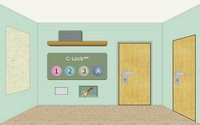
 TODA - The Office District Adventure is an online point and click type room escape game like the game MOTAS - Mystery Of Time And Space. Your task is getting to the most protected corporation's departaments and find well-kept documents, using available things and solving various riddles. Good luck and have fun!
Click here to play
Play Random Game
Frequently Asked Questions about TODA
What is TODA?
TODA is an escape game to play and have fun while you try to escape from the room or outdoor place by using your point and click and puzzle solving skills. You may need to find and use hidden items and clues around, combine some items with other items to use them on correct places, and solve some different types of puzzles.
How can I play TODA?
You can play TODA game with your mouse and point and click skills to find items and clues, use them on correct places, and solve some puzzles. You can navigate between rooms or screens and you may also zoom on some places to look closer. You may select items from your inventory to use or you may drag and drop them.
How can I solve TODA?
You can solve TODA game by looking around to find and use items and clues on correct places, combining items, and solving some puzzles. You can also check comments section for hints or ask to other players to get help from them. If you still can't figure out any part of the game, you can also check video walkthroughs.
Can I post hints for TODA?
Yes, you can post your comments to share your hints or walkthroughs for TODA game to help other players. They may check your hints, if they can't figure out some parts of games. You can also reply and help other players, if they ask for help in comments section. We will all be thankful for your help and hints for the games.
Can I play TODA on my phone or tablet?
Yes, like most of new online escape games here, you can also play TODA game on your mobile phone or tablet. You just need to visit our website on your mobile device's browser to play games online. We also post and share new mobile escape games to download and play directly on your Android or iOS mobile device.
3 Comments
i'm stuck at the C-Lock code! can anybody gimme a hint?
ReplyDeleteGet the key in the cubby below the C-Lock.
ReplyDeleteGet the CD from the box on the shelf above the C-Lock.
Click the key under "THINGS" and click the door on the right.
Click the green card on the window.
Click the note to the left of the laptop. It tells you what the C-Lock buttons do.
Click the CD under "THINGS" and click on the laptop. The number that appears changes each time. Remember this number.
Click the door to go back to the original room.
Click the card under "THINGS" and click the window that looks like a scanner under the C-Lock.
The first button adds five, the second subtracts ten, and the third doubles the amount you have. Clicking one button more than four times consecutively resets it back to zero.
You must get to the number you received on the laptop and click the A button.
*For example: My number is 125. I clicked the first button two times to get 15. I clicked the third button to get 120. I clicked the first button again to get 125. Click A and the door directly next to the C-Lock is unlocked.
Click the door directly to the left of the C-Lock.
Level 2
Click the box on the shelf to get a key.
Open the drawer and pick up the disk (green).
Get the disk on the scales (pink).
Click the door on the right to return to the other room.
Click the key under "THINGS" and click on the safe on the left wall and you will get a disk (blue).
Note the books. The books on the bookshelf tell you what order the disks must be placed later.
Click left to the laboratory.
Note the Roman numerals on the wall. The number it makes will be the code.
(Use this converter if you're stuck. The number changes every time. http://www.guernsey.net/~sgibbs/roman.html)
Put the disks in the correct order. (Green, blue, pink.)
Enter the number you derived from the Roman numerals.
Click the arrow at the bottom to return to the room.
Click the door on the right.
Click the door directly ahead that is now unlocked.
That's it! (For now?)
Walkthrough: New Version
ReplyDelete1. Grab key which is in front of you
2. Use it on the door on the right.
3. Grab pencil on top of desk and use it on the slot on the printer to get battery
4. Grab CD in top drawer
5. Grab card on window seal
6. Use card on scanner in first room
7. Put battery in on the connection's manager on he shelf
8. Go back in right room and place CD in bottom disk tray
9. Press green button
10. Remember code
12. Go back to first room
13. This is the difficult part, using the first three buttons from the left input your code from the computer. Note: The first button when I played added five. The second subtracted ten. The third added two.
14. Enter newly unlocked door
YOU ARE NOW ON THE SECOND LEVEL
15. Go left open drawer get blue CD
16. Grab red CD on scale
17. Grab key by clicking on black box on the shelf
18. Go back to the first room you were in at the beggining of level 2
19. Use key on box on the side of the wall on the left
20. Get the last CD
21. Go to the left room and click on calculator on the wall
22. Place CD's in the calculator slots in order from the books in the first room on level 2. Example: If the first book is blue, put the blue CD first
23. Zoom back out, look at the Roman Numerals above calculator. Wright them down. Refer to this link to translate your code. http://www2.inetdirect.net/~charta/Roman1-3999.PDF
24. Open door and your done, with the first two levels anyways
You can post your comments to share your opinion about games, share your hints to help other players or ask help from them. If you can't sign in with your Google account, when you try to post your comment, you have to allow cookies on your browser for this website.
EmojiYou can also check recent comments to help other players, if they need help about games.