
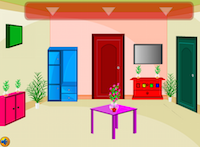
 OleGames - Ole Townhouse Adventure Escape is another point and click room escape game developed by Ole Games. In this adventure game you have to escape from the town house. You have been trapped in the townhouse and you have to escape from it. Solve the puzzle and fine the right object to escape the town house. If you feel hard to play stuck in any area, just click the walk-through button to know how to solve the puzzle and how to open the all locks to escape from the town house. Good luck and have fun!
Play Ole Town House Adventure Escape
Play Random Game
Advertisement
Frequently Asked Questions about Ole Town House Adventure Escape
What is Ole Town House Adventure Escape?
Ole Town House Adventure Escape is an escape game where you explore different rooms or outdoor locations, search for hidden objects and useful clues, solve puzzles, and try to find your way out. You may need to examine your surroundings carefully, collect and use different items, combine objects to discover new possibilities, and figure out how to solve various puzzles. Use your observation, logical thinking, and problem-solving skills to overcome challenges, discover secrets, and complete the game.
How can I play Ole Town House Adventure Escape?
You can play Ole Town House Adventure Escape using your mouse or touchscreen, depending on your device. Point and click on different objects and areas to explore your surroundings, find hidden items, collect useful clues, and interact with things that may help you progress. You may need to navigate between different rooms or screens, zoom in to examine certain areas more closely, and select items from your inventory to use them in the right places. Some games also allow you to combine items or drag and drop them to interact with objects and solve puzzles.
How can I solve Ole Town House Adventure Escape?
To solve Ole Town House Adventure Escape, carefully explore every available area and pay attention to objects, details, and clues that may help you progress. Collect useful items, examine them, combine objects when necessary, and try using them in places where they might be needed. Remember that some puzzles require you to discover clues in different rooms or complete several steps before finding the correct solution. If you get stuck, you can check the comments section below for hints and tips, ask other players for help, or watch a video walkthrough to see how to solve difficult parts of the game and complete it.
Can I post hints for Ole Town House Adventure Escape?
Yes! You are welcome to post comments and share your hints, tips, solutions, or complete walkthroughs for Ole Town House Adventure Escape to help other players. If you have discovered how to solve a difficult puzzle, found a hidden item, or figured out how to progress through a challenging part, feel free to explain it in the comments section. You can also ask questions when you need help and reply to other players who are looking for solutions. Sharing useful hints and helping each other makes playing escape games more enjoyable for everyone, and we appreciate your contributions.
Can I play Ole Town House Adventure Escape on my phone or tablet?
Yes, if Ole Town House Adventure Escape supports mobile devices, you can also play it on your smartphone or tablet. Simply visit EscapeGames24 using your mobile device's web browser, open the game, and start playing without needing a computer. Many of the new online escape games shared on our website are compatible with mobile browsers and touchscreen controls. We also feature mobile games that you can download and play directly on your Android or iOS device. Check the game's description for information about its supported devices and platforms.
38 Comments
Hi folks:)!!!
ReplyDeleteMissing you all
Start on the clock
Hi Dazz, I'm here.
ReplyDeleteI have found four coloured letters for the drawer and opened a pink drawer. Needed some time to understand the navigation. ;-)
Got all puzzle pieces for another letter clue.
ReplyDeleteUse the uv on the picture, hi Meritneith!!
ReplyDeleteOf course I'm looking where to use that clue. But I found a number-letter code which gave a remote.
ReplyDeleteNavigation is confusing, missing blue letter
ReplyDeleteThe clue on the blue table on the right of first room is for the clock
ReplyDeleteWhat's this? In the first scene there's a green cupboard on the left wall. The code should be FEXR. The cb opens but there's nothing in it. When I zoom out it's closed again. I can repeat this a thousand times.
ReplyDeleteUse the patterns on the red cb for the buttons to get the uv
ReplyDeleteBlue letter: Go through the pink door, then above the blue picture.
ReplyDeleteI have 3# clue from plant in scene of pink door and clue from tv, neither works anywhere!
ReplyDeleteThanks meritneith!! That's where you use the tv clue!
ReplyDeleteI don't get the pattern thing. The clue is for a 4x4 grid. I can't use that for the six buttons left of the clue, and the red cb on the opposite wall has a 5x4 grid.
ReplyDeleteTrying to find where to use that3#!!
ReplyDeleteFor the 3# clue: Go through the pink door again and use it on the pink drawer.
ReplyDeleteAh - the yellow buttons go on the cb where the pattern clue is.
ReplyDeleteMeritneith!! The cb where you place the yellow buttons, from first scene,through green door, then pink door.
ReplyDeleteSee the pattern is 4*4, use it on the buttons right cb in the sam e room,start from the top dot in first row
I've already opened the pink drawer with the clue from the picture meritneith!! Still have 953
ReplyDeleteWell, then keep it, don't think you need it again. There's another 3# code on one of the pink flower pictures but 953 doesn't work. Further I have a key but no fitting keyhole (the only I have seen is the door but nada).
ReplyDeleteUse the flashlight on the clock in the same room where you found it meritneith!!
ReplyDeleteHaha meritneith, same here
ReplyDeleteAnd thanks for the red cb help. Got the uv now. Crap game!
ReplyDeleteAnd that code goes in the same room, don't look anywhere
ReplyDeleteI escaped without completing the picture and missing two codes!?
ReplyDeleteUse the crowbar and then the key on the place where you use the 4 pentagons to get the exit key.
Ah! There are two pink flowers pictures, one that gives you the 3# clue, and a second one to use that clue on
ReplyDeleteLOL Meritneith!! You know where to use it
ReplyDeleteDid you go through the pink door of the clock meritneith? Found where 953 and the Pentagon's go
And yep, very crappy game, terrible navigation and terrible inventory.
ReplyDeletePicture gives you letters code Meritneith!!
ReplyDeleteYes small-tool, that's true, out now too. Bad game, eh?
ReplyDeleteWhat the? The cb where you use that code from the picture is empty!!
ReplyDeleteYep, very bad game. Pattern hint was wrong as well. Hint was a 4x4 grid, but you have to treat it like a 4x5 grid. So make the pattern on the hint but go further to the bottom as hinted.
ReplyDeleteFound the last button in room of pentagons. behind the plant
ReplyDeleteNot to talk about the FEXR red herring.
ReplyDeleteNo fun, bad grafics, poor puzzles!!
ReplyDeleteOut, not enjoyable though!
ReplyDeleteOk, Next, I will do the good game for you. Thank you for the comments.
ReplyDeleteWhoops! The author himself is listening to all your rants...well, some particular criticism would have been enough for him so say "OK, kiss my ass, no more will to sacrifice my spare time with that kind of reception"...
ReplyDeleteOk, words like 'crap(py)' could have been avoided and other words good be toned down a bit, I guess, (like 'terrible'). But still the criticism is clear and honest, imho.
ReplyDelete- An inventory with things all in their own place (so sometimes a lot of scrolling while there are enough open slots on top) and also no difference in shade between an item already used or an item active at that moment.
- Navigation that's very confusing.
- A 4x4 grid hint that's used for a 4x5 puzzle.
- Doing 2 (or was it 3) codes that finally leads to just an empty place (a red herring).
But fair enough it could have been worded differently (but that's what happens while playing and getting frustrated), but it's still useful info for a maker to improve his/her games.
You can post your comments to share your opinion about games, share your hints to help other players or ask help from them. If you can't sign in with your Google account, when you try to post your comment, you have to allow cookies on your browser for this website.
EmojiYou can also check recent comments to help other players, if they need help about games.